Subscribe notifications to the tag:
Headline.

Written by Michal Hašek, Wednesday 4 November 2026
For anyone relying on location data from deployed routers – in vehicles, on construction sites, in remote monitoring setups – the details of GNSS configuration matter. ICR-OS 6.6.2 adds the ability to choose which satellite constellations the router uses, giving you more control over positioning accuracy and reliability.
How GNSS works on ICR routers
GNSS – Global Navigation Satellite System – is the umbrella term for satellite positioning systems. GPS is the most well-known, but there's also Galileo (European), GLONASS (Russian), BeiDou (Chinese), and others. Each operates its own constellation of satellites, and a receiver can use signals from one or more simultaneously.
ICR routers with a GNSS module report position data – latitude, longitude, altitude, timestamp – to the router's status page, to connected applications via NMEA output, or to a remote server through protocols like LwM2M, MQTT, DNP3, or Cumulocity. The accuracy of that data depends on how many satellites the receiver can see, which is where constellation selection comes in.
Active vs. passive antennas
The antenna choice directly affects what you get out of the GNSS module. A passive antenna is a simple receiving element with no amplification – fine when the antenna is close to the router with a clear view of the sky. An active antenna includes a built-in amplifier, which helps when the cable run is long or the sky view is partially obstructed. For antennas mounted inside vehicles or buildings, or with a long cable run, an active antenna is usually the better choice.
On ICR routers, if the hardware module supports active antennas, power is supplied automatically – there's nothing to configure. Most modules support active antennas; purely passive input is the exception. You can check which antenna type your router supports in its datasheet, in the GNSS section of the specifications.
One note on multi-constellation antennas: GPS and Galileo share the same frequency band, so any antenna that receives GPS also receives Galileo. Separate band support only becomes relevant for GLONASS or BeiDou. If you plan to use those constellations, make sure the antenna covers the corresponding bands.
Advantech offers a range of compatible GNSS antennas – both standalone GNSS antennas and combined models that integrate GNSS with cellular and/or Wi-Fi in a single housing. Combined antennas are a practical choice for vehicles and outdoor cabinets, where one mounting point is easier than several. See the full range at Antennas – Advantech ICR.
What's new in 6.6.2: constellation selection
Before 6.6.2, the GNSS module used a fixed set of constellations. Starting with 6.6.2, you can choose which satellite systems the router actively uses under Configuration → Services → GNSS.
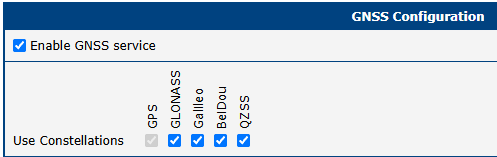
The available constellations depend on the specific GNSS module in your router model – not all modules support the same combinations. The supported systems are listed in each router's datasheet, in the GNSS section of the specifications (BeiDou may appear there as BDS). GPS and Galileo are enabled by default. Note that this setting is not available on all older modules (e.g. SmartFlex).
Why does this matter? More satellites means better positioning. In open sky the difference is modest, but in challenging environments – urban areas, sites with partial sky obstruction – the difference between tracking 6 satellites or 14 can mean the difference between a reliable fix and no fix at all. Regional relevance also plays a role: Galileo has strong coverage across Europe, while BeiDou is well-optimised for Asia-Pacific deployments.
Improved GNSS status page
The GNSS status display now shows satellites from all enabled constellations, not just the primary one. This makes it easier to verify the setup and diagnose positioning issues in the field.
A note on NMEA output
ICR routers expose GNSS data in NMEA format – the standard protocol understood by virtually every GPS-aware application and mapping software. The NMEA stream automatically reflects whichever constellations are active, so connected applications benefit from broader satellite coverage without any changes on their side.
Where to find it
GNSS constellation selection is available on ICR routers with a compatible GNSS module running ICR-OS 6.6.2, under Configuration → Services → GNSS. The firmware is available on the Firmware page. For full configuration details, refer to the Configuration Manual for your router model.
Not sure which ICR models come with a GNSS module? In the Router Selector, select the GPS filter to list all models equipped with GNSS.

