Subscribe notifications to the tag:
Headline.

Written by Miloslav Bien, Wednesday 8 July 2026
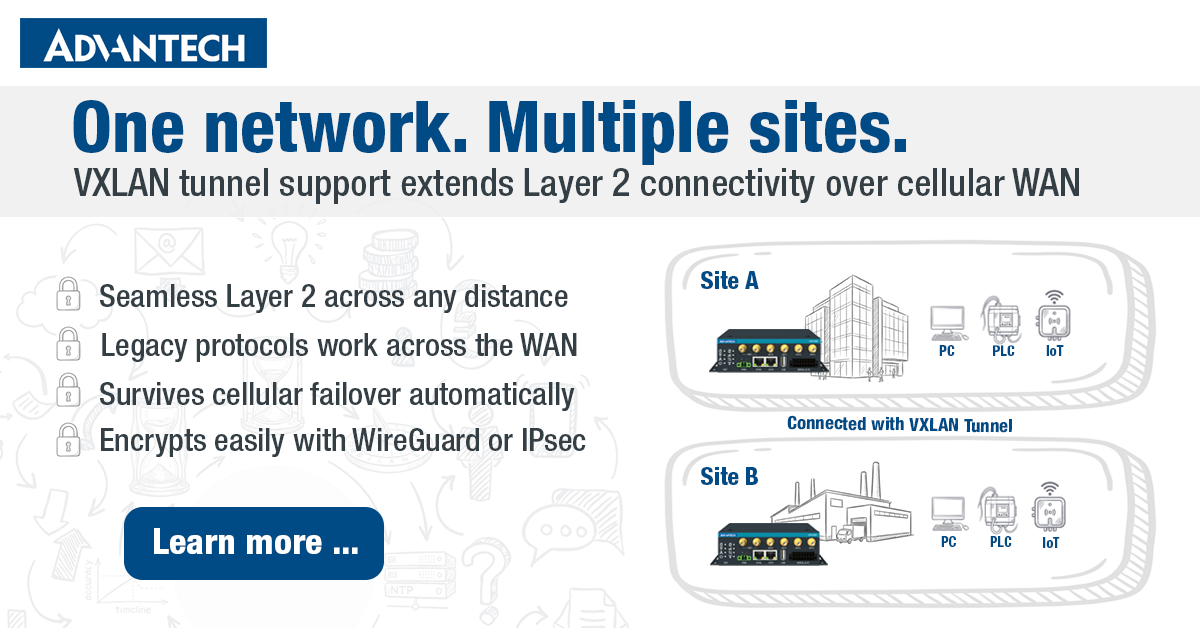
Most people think of a network as something that lives in one place – a building, a factory floor, an office. But what if your devices are spread across multiple locations, and you still need them to behave as if they’re on the same local network? That’s the problem VXLAN solves. And as of ICR-OS 6.6.1, it’s now natively supported on Advantech cellular routers.
What is VXLAN, and why does it matter?
VXLAN stands for Virtual Extensible LAN. In plain terms, it’s a tunneling technology that takes Layer 2 Ethernet traffic – the kind that normally only works within a single physical network – and wraps it up so it can travel over a Layer 3 IP network, like the internet or a cellular WAN link.
Why does that distinction matter? Layer 2 connectivity means devices can discover each other automatically, share broadcasts, and run protocols that simply don’t work across routed networks. Think of things like network printers, legacy industrial controllers, or building automation systems – equipment that was designed to live on a single LAN and has no concept of routing.
With VXLAN, you can connect a machine at a remote site to your main office network as if it were plugged into the same switch – even if it’s hundreds of kilometers away, connected only via a cellular link. For engineers managing distributed infrastructure, that’s a significant capability.
How does it work under the hood?
VXLAN works by encapsulating Ethernet frames inside UDP packets. Each tunnel is identified by a VNI – a VXLAN Network Identifier – which is a 24-bit number, meaning you can run up to roughly 16 million isolated virtual networks in parallel. Compare that to traditional VLANs, which top out at 4,096 segments.
The two endpoints of a VXLAN tunnel are called VTEPs (VXLAN Tunnel Endpoints). Each router involved acts as a VTEP: it takes outgoing Ethernet frames, wraps them in a UDP packet addressed to the remote router, and sends them across the WAN. On the other end, the receiving router strips the wrapper and delivers the original Ethernet frame to the local network – as if it had never traveled anywhere.
One important note: VXLAN on its own does not encrypt traffic. If you’re deploying over a public network, it’s strongly recommended to run the VXLAN tunnel inside an encrypted VPN – IPsec or WireGuard both work well for this.
VXLAN on Advantech ICR routers
On Advantech ICR routers running ICR-OS 6.6.1, VXLAN is configured under Configuration → VXLAN. Each router supports up to four simultaneous VXLAN tunnels, which can be useful when connecting multiple remote sites independently. VXLAN is supported on all ICR models with the exception of ICR-1600, ICR-1700, and the following models: ICR-2031, ICR-2431, ICR-2531, ICR-2412, ICR-2432, ICR-2436, ICR-2437, ICR-2631, ICR-2041, ICR-2441, ICR-2501, ICR-2438, ICR-2545, ICR-2413, ICR-2452, and ICR-2452 RedCap.
The key parameters for each tunnel are:
- Local Address – the IP address of the router itself, used as the VTEP source
- Remote Address – the IP address of the remote router (VTEP peer); for secure deployments, this should be an IP within an established VPN tunnel
- VNI – the tunnel identifier (1–16777215); must match on both ends
- MTU – recommended value is 1450 bytes for a direct VXLAN connection, to account for VXLAN header overhead and avoid packet fragmentation. When running VXLAN inside a VPN tunnel (IPsec or WireGuard), additional overhead may require a lower MTU value – if you’re unsure, it’s worth consulting Advantech support for your specific setup.
- Bridged mode – when enabled, the VXLAN interface is added to the router’s local bridge, providing seamless Layer 2 connectivity; when disabled, it operates as a routed interface with its own IP address
A typical deployment connects two sites over an existing WireGuard or IPsec VPN. Both routers are configured with matching VNI values and each other’s VPN IP as the remote address. With Bridged mode enabled, devices at both sites end up on the same Layer 2 segment – broadcasts pass through, local discovery works, and legacy protocols that don’t route well behave as expected.
Connecting more than two sites
Connecting two routers with a single VXLAN tunnel is straightforward. But what if you need to bring three or more sites onto the same Layer 2 network?
The current implementation does not support multicast, which means there is no automatic way to broadcast traffic to multiple peers at once. Instead, each pair of routers must be connected with its own dedicated VXLAN tunnel – and each tunnel must use a unique VNI. A router cannot have two VXLAN tunnels sharing the same VNI.
In practice, this means a full mesh topology. If you want to connect three sites – A, B, and C – you need three tunnels: A↔B, A↔C, and B↔C, each with a different VNI. With four sites, that’s six tunnels; with five sites, ten. Since each router supports up to four simultaneous VXLAN tunnels, this limits full-mesh deployments to a maximum of five sites before additional tunnels would be needed beyond that cap.
For smaller deployments – two or three sites – this is entirely manageable and works well in practice.
Resilience: what happens when the WAN link switches?
Unlike connection-oriented tunnels that need to be actively established, a VXLAN tunnel doesn’t have a handshake or session state to maintain. It simply exists as a network interface on the router. This means that if the primary WAN link fails and the router switches to a backup cellular connection, the VXLAN tunnel continues to function on the new link without any intervention – as long as the remote address is still reachable. For deployments that rely on cellular failover, this is a meaningful advantage.
A note on security configuration
Creating a VXLAN tunnel does not automatically configure any firewall rules or routing entries. The router leaves both entirely up to the administrator. This gives you full control, but it also means that securing the tunnel – restricting which traffic can flow through it and from where – is your responsibility. At a minimum, it’s recommended to whitelist the VXLAN UDP port (default 4789) to allow traffic only from the known peer IP address, and to ensure VXLAN traffic is carried inside an encrypted VPN rather than exposed directly to the internet.
When should you use it?
VXLAN is a good fit when you need to:
- Connect remote sites to a shared Layer 2 segment without replacing existing equipment
- Support legacy industrial or building automation devices that rely on Layer 2 broadcasts
- Extend a data center network across geographically distributed nodes
- Run multiple isolated virtual networks over the same physical WAN infrastructure
It’s worth noting that VXLAN is not a replacement for a standard VPN. A VPN secures your traffic; VXLAN extends your network topology. In practice, the two work best together – VPN for encryption and authentication, VXLAN for the Layer 2 overlay on top.
Available now in ICR-OS 6.6.1
VXLAN support is available on Advantech ICR routers running ICR-OS 6.6.1. The firmware is available for download on the Firmware page.
For full configuration details, refer to the Configuration Manual.